Role Access Control (User Role Permissions)
Watch the full video tutorial for Role Access Control (User Role Permissions) in ALZERP Cloud ERP
ALZERP Cloud ERP incorporates a robust Role-Based Access Control (RBAC) system to ensure that users have appropriate access to different modules and functionalities within the software. Users form access control by roles feature in ALZERP enhances security, prevents unauthorized access, and promotes efficient workflow.
In today’s rapidly evolving business landscape, the need for secure, efficient, and scalable enterprise resource planning (ERP) systems is paramount. ALZERP Cloud ERP Software offers a robust solution for businesses, integrating various functions such as inventory management, sales tracking, and vendor management under one platform. One of the most critical features within ALZERP is its Role-Based Access Control (RBAC) system, which allows organizations to manage user permissions effectively, ensuring that employees have access only to the data and tools necessary for their roles.
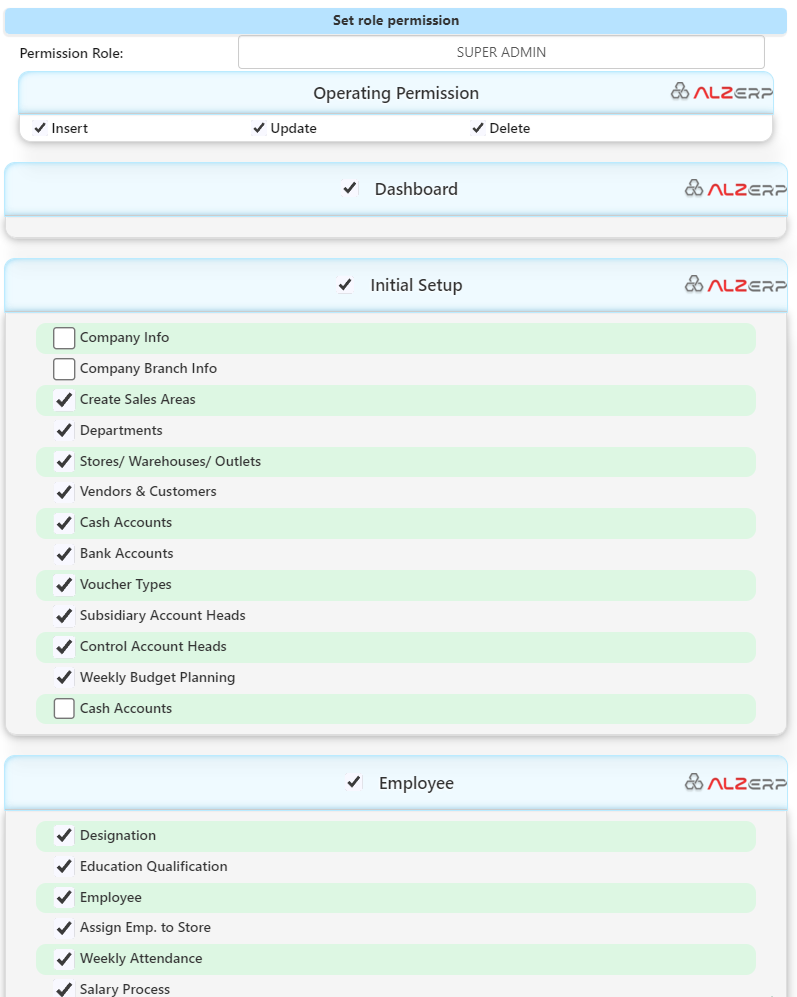
Understanding Roles in ALZERP:
ALZERP defines various roles with specific access permissions:
- SUPER ADMIN: Has unrestricted access to all modules and features.
- ADMIN: Possesses extensive administrative privileges.
- DEPARTMENT ADMIN: Manages activities within a particular department.
- FINANCE ADMIN: Handles financial activities.
- HR ADMIN: Manages employee management.
- PURCHASE ADMIN: Oversees purchase management.
- STORE KEEPER: Manages store operations.
- SALES REPRESENTATIVE: Has limited access for sales and distribution.
- USER: Has restricted access and requires assigned permissions.
Assigning Roles to Users:
The RBAC system in ALZERP allows administrators to assign roles to individual users. This ensures that each user has access only to the modules and features relevant to their job responsibilities.
Role-Based Access Permissions:
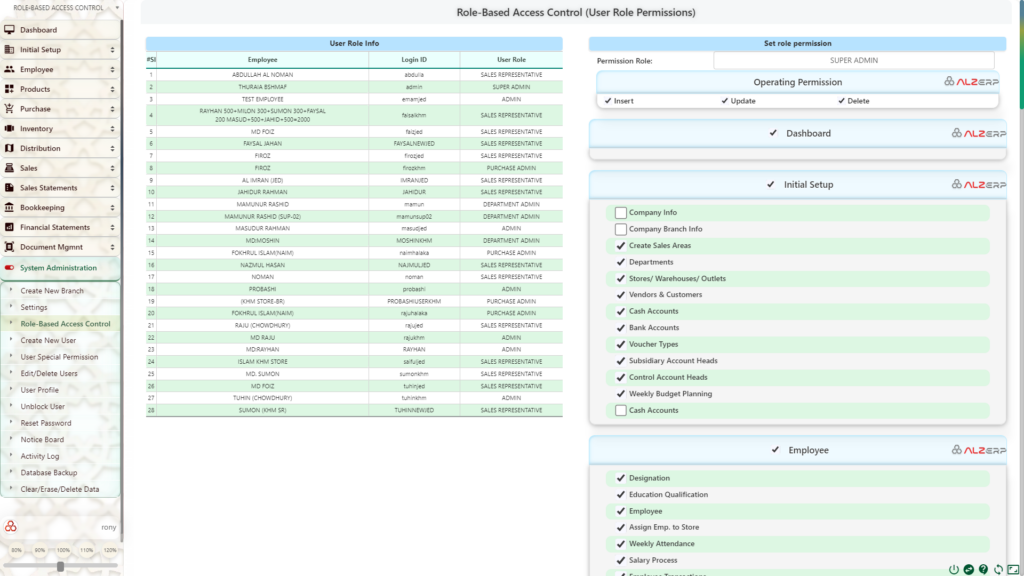
- Role-Based Access Users by Role: Displays a list of users and their assigned roles.
- Set Role Permission: Enables administrators to configure permissions for each role.
Permission Levels:
- Operating Permission: Determines whether a user can insert, update, delete, or perform other actions within a module.
- Form/Menu Level Access Permission: Grants access to specific forms or menus within a module.
ALZERP’s Comprehensive RBAC System:
ALZERP’s RBAC system covers a wide range of modules, including:
- Dashboard
- Initial Setup
- Employee
- Products
- Purchase
- Inventory
- Sales
- Sales Statements
- Bookkeeping
- Financial Statements
- Document, Tax & Zakat
- System Administration
By effectively utilizing RBAC, ALZERP ensures that users have the necessary access to perform their tasks while preventing unauthorized access to sensitive data. This enhances security, improves efficiency, and maintains a controlled environment within the ERP system.
Understanding Role-Based Access Control (RBAC) in ALZERP
Role-Based Access Control (RBAC) is a security mechanism that restricts system access to authorized users based on their role within an organization. In ALZERP, RBAC is designed to provide granular control over what users can see and do within the ERP system. This control ensures that sensitive information is protected while allowing employees to perform their tasks efficiently.
ALZERP’s RBAC system categorizes users into different roles, each with its own set of permissions. These roles define what actions a user can perform (such as inserting, editing, updating, or deleting data) and what modules or forms they can access.
Roles in ALZERP
ALZERP Cloud ERP Software provides several predefined roles, each with varying levels of access and permissions:
- SUPER ADMIN: This role has the highest level of access within the ERP system. A Super Admin can manage all aspects of the system, including system administration, user management, and full access to all modules and forms.
- ADMIN: The Admin role is similar to the Super Admin but with slightly reduced privileges. Admins can manage most system settings and have broad access to the ERP’s features.
- DEPARTMENT ADMIN: This role is designed for users who manage specific departments. Department Admins have access to all activities and data related to their department but are restricted from accessing other departments’ information.
- FINANCE ADMIN: A Finance Admin has special access to financial activities within the ERP system, such as managing accounting heads, voucher entries, and financial statements.
- HR ADMIN: HR Admins are responsible for managing employee-related activities, including payroll, attendance, and employee transactions.
- PURCHASE ADMIN: This role focuses on the management of purchasing activities, including purchase orders, supplier ledgers, and purchase history.
- STORE KEEPER: Store Keepers manage store-related activities, including inventory, stock adjustments, and distribution.
- SALES REPRESENTATIVE: This role is geared towards users involved in sales and distribution, granting them access to sales order processing, invoicing, and customer management.
- USER: The most basic role with limited access. Users must be explicitly granted permissions to perform specific tasks within the ERP system.
Setting Role Permissions in ALZERP
One of the strengths of ALZERP’s RBAC system is its flexibility in setting permissions for each role. Here’s how you can configure role permissions within ALZERP:
- Select the Role: Begin by selecting the role you wish to configure from a dropdown list. ALZERP displays all available roles, allowing you to choose the one that needs permission adjustments.
- Set Operating Permissions: Once the role is selected, you can define the specific actions users under this role can perform. These actions include Insert, Update, Delete, and Edit. For instance, a Department Admin might have the permission to update and edit department-related data but might be restricted from deleting critical records.
- Configure Form/Menu Level Access: ALZERP provides an extensive list of forms and modules within the ERP system. You can enable or disable access to specific forms or modules for the selected role. This level of control ensures that users only interact with the parts of the system relevant to their job functions.
- Dashboard: Access to the system’s main dashboard.
- Initial Setup: Control over company info, branch info, sales areas, departments, and stores.
- Employee Management: Permissions for managing employee profiles, attendance, and payroll.
- Product Management: Control over product categories, barcode printing, and price history.
- Purchase and Inventory Management: Access to purchase orders, stock adjustments, and inventory tracking.
- Sales and Financial Management: Permissions related to sales processing, customer ledger management, and financial reporting.
- System Administration: Access to critical system functions like creating new branches, user management, and database backup.
- Apply and Save Permissions: After configuring the permissions, save the changes to apply them to the selected role. Users under this role will now operate within the defined parameters, ensuring a secure and organized workflow.
Role-Based User Management: A Sample Scenario
To illustrate the functionality of ALZERP’s RBAC system, consider the following scenario:
- Employee A is assigned the role of Sales Representative. This role gives them access to sales-related forms such as POS (Point of Sale), Sales Return, and Sales Analysis Reports. However, they do not have access to financial statements or employee management modules, ensuring they focus solely on sales activities.
- Employee B is a Department Admin for the HR department. They have permissions to manage employee profiles, process salaries, and track attendance. However, they are restricted from accessing financial modules or purchase orders, limiting their access to HR-related functions only.
- Employee C is the Super Admin. They have unrestricted access to all forms, modules, and system settings. This role is typically reserved for top-level management or IT administrators responsible for the overall system management.
The Importance of Role-Based Access Control
Implementing Role-Based Access Control within an ERP system like ALZERP offers several key benefits:
- Enhanced Security: By restricting access based on user roles, sensitive data is protected from unauthorized access, reducing the risk of data breaches.
- Improved Efficiency: Users are provided with the tools and data they need to perform their tasks, eliminating unnecessary access and reducing complexity.
- Scalability: As your business grows, you can easily add new roles and adjust permissions, ensuring that your ERP system scales with your operations.
- Customization: ALZERP’s RBAC system allows for deep customization of user roles, tailoring the system to meet the unique needs of your business.
- Compliance and Reporting: By controlling who has access to what data, businesses can ensure compliance with industry regulations and generate accurate reports on user activity.
List of User Forms in ALZERP
    Dashboard

    Initial Setup
        Company Info
        Company Branch Info
        Create Sales Areas
        Departments
        Stores/ Warehouses/ Outlets
        Vendors & Customers
        Cash Accounts
        Bank Accounts
        Voucher Types
        Subsidiary Account Heads
        Control Account Heads
        Weekly Budget Planning
        Cash Accounts
    Employee
        Designation
        Education Qualification
        Employee
        Assign Emp. to Store
        Weekly Attendance
        Salary Process
        Employee Transactions
        Employee Ledger
        Employee Transfer
    Products
        Unit of Measurements
        Product Category
        Product Subcategory
        Product
        Barcode Print
        Product List
        Print Product List
        Price Change History
    Purchase
        Purchase Entry
        Purchase Return
        Supplier Ledger
        Creditors (Vendors) List
        PO (Purchase Order)
        Purchase History
        Purchase List
        C&F Ledger
    Inventory
        Current Stock Position
        Current Stock With Price
        Stock Register
        Quick Search
        Stock Adjustment
        Category Stock Value
        Distribution
        Stock Distribution
        Sales Order Requisition
        Sales Order Delivery
        Pending Items
        Damaged Items Entry
        Damage Approval
        Damage Report
    Sales
        POS
        Multi Sales
        Due Collection
        Sales Return
        Discounts Apply
        Discounts Approval
        Cash Transfer
        Partial Cash Transfer
        Cash Transfer to Bank
    Sales Statements
        Customer Ledger
        Sales Analysis Reports
        Salesman Performance
        Debtors (Customers Due)
        Money Collection History
        Print Invoices
    Bookkeeping
        Accounting Heads
        Voucher Entry
        Daily Cash Payment
    Financial Statements
        Cash Book
        Bank Book
        Chart of Accounts
        A/C Head Ledger
        Control A/c Ledger
        Subsidiary A/c Ledger
        Trade Receivables
        Trade Payable
        Trial Balance
        Trial Balance Details
        Income Statement
        Balance Sheet
        Balance Sheet Details
        Budget Expenses Ledger
        Weekly ROI Insights
    Document, Tax & Zakat
        Documents Library
        Letter Printing
        LC Data Entry
        LC Details Report
        LC Transactions Report
        (LC) Vendors Ledger
        LC Payment
        VAT Paid Expenses
        VAT Expense Report
        Other Purchases (VAT Paid)
        VAT Purchase Report
        Reference Codes
        Tax Return
        Zakat Report
        VAT Invoice Printing
        VAT Data Processing
        Vat Submission
    System Administration
        Create New Branch
        Settings
        Role-Based Access Control
        Create New User
        User Special Permission
        Edit/Delete Users
        User Profile
        Unblock User
        Reset Password
        Notice Board
        Activity Log
        Database Backup
        Clear/Erase/Delete Data
Conclusion
Role-Based Access Control in ALZERP Cloud ERP Software is a powerful feature that ensures your business operates securely and efficiently. By managing user access through predefined roles, ALZERP allows you to protect sensitive data, streamline workflows, and scale your operations seamlessly. Whether you’re a small business or a large enterprise, ALZERP’s RBAC system provides the flexibility and control needed to optimize your ERP experience.
This article integrates keywords such as ERP software, cloud-based software, inventory management software, sales tracking software, and business management software to ensure it reaches the right audience and provides value to businesses looking to enhance their role-based access control within their ERP systems.