
How ZATCA Electronic Invoicing Helps Saudi Restaurants Avoid Fines

ZATCA electronic invoicing (e-invoicing) is a mandatory requirement by Saudi Arabia's Zakat, Tax and Customs Authority requiring all businesses, including restaurants, to generate structured electronic invoices with specific fields: seller name, VAT number, timestamp, VAT amount, and a TLV-encoded Base64 QR code. Non-compliance penalties start at 5,000 SAR per violation.
ZATCA electronic invoicing is no longer a future regulation — it is the law in Saudi Arabia today. Every restaurant, café, and food-and-beverage outlet across Riyadh, Jeddah, Dammam, and every other Saudi city must issue structured electronic invoices that comply with the standards set by the Zakat, Tax and Customs Authority (ZATCA). Failure to comply can result in fines ranging from 5,000 SAR for a first offense to 50,000 SAR for repeat violations. In this comprehensive guide, we explain exactly what ZATCA e-invoicing requires, how the QR code system works at a technical level, and how ALZERP POS automates the entire compliance process so you can focus on serving great food instead of worrying about penalties.
What is Electronic Invoicing (Fatoorah)?
Electronic invoicing, known locally as الفوترة الإلكترونية (Fatoorah), is a system mandated by ZATCA that replaces traditional handwritten or PDF-based invoices with structured, machine-readable digital invoices. Under this system, every sales transaction must produce an electronic invoice that is generated, stored, and shared in a standardized digital format.
The e-invoicing initiative is a core pillar of Saudi Arabia's Vision 2030 digital transformation strategy. By digitizing all commercial transactions, the Kingdom aims to increase tax transparency, reduce VAT evasion, and create a modern digital economy. For restaurants, this means that the days of simple thermal receipt rolls with just a total amount are over. Every single invoice printed at your cashier must now include specific mandatory data fields and a scannable QR code.
ZATCA rolled out e-invoicing in two major phases:
- Phase 1 — Generation Phase (effective December 4, 2021): All VAT-registered businesses must generate e-invoices through a compliant electronic system. Handwritten or manually typed invoices are prohibited. The invoice must include a QR code for simplified tax invoices (B2C transactions).
- Phase 2 — Integration Phase (rolling implementation from January 1, 2023): Businesses in selected groups must integrate their invoicing systems directly with ZATCA's Fatoorah platform for real-time reporting and clearance of invoices.
Most small-to-medium restaurants in Saudi Arabia are currently required to comply with Phase 1 requirements. ALZERP POS is fully ZATCA Phase 1 compliant, generating every invoice with the correct data fields and a properly encoded QR code — automatically, with zero manual intervention.
Figure 1: A fully compliant ZATCA invoice with auto-generated TLV QR code
ZATCA Requirements for Restaurant Invoices
ZATCA has published detailed technical specifications for what constitutes a valid electronic invoice. For restaurants issuing simplified tax invoices (which cover the vast majority of dine-in, takeaway, and delivery transactions), the following fields are mandatory on every printed or digital invoice:
- Seller's Name (اسم البائع): The registered business or trade name of the restaurant.
- VAT Registration Number (الرقم الضريبي): Your 15-digit VAT number issued by ZATCA.
- Invoice Date and Time (التاريخ والوقت): The precise timestamp of when the invoice was generated, formatted as an ISO 8601 date-time string.
- Invoice Total with VAT (الإجمالي شامل الضريبة): The final total amount the customer pays, inclusive of the 15% VAT.
- VAT Amount (مبلغ الضريبة): The explicit VAT amount calculated on the transaction.
- QR Code: A TLV-encoded, Base64-encoded QR code that encapsulates the five data elements above in a machine-readable format.
- Invoice Sequential Number: A unique, sequential identifier for each invoice (ALZERP uses the format YYYYMMDD-NNNNNN).
- Description of Goods or Services: Itemized list of products sold with individual prices.
For restaurants, this means every order — whether it is a single coffee, a family meal, or a catered banquet — must generate an invoice containing all of these fields. Your POS system must be capable of producing this data automatically at the point of sale without relying on the cashier to manually enter VAT numbers or calculate tax amounts.

Figure 2: Complete invoice history with search and filter capabilities
Simplified Tax Invoice vs Full Tax Invoice
ZATCA recognizes two types of electronic invoices, and it is critical for restaurant owners to understand the difference:
| Feature | Simplified Tax Invoice (فاتورة ضريبية مبسطة) | Full Tax Invoice (فاتورة ضريبية) |
|---|---|---|
| Used For | B2C transactions (customer walks in, orders, and pays) | B2B transactions (invoices sent to other businesses) |
| Buyer VAT Number | Not required | Mandatory |
| Buyer Name & Address | Not required | Mandatory |
| QR Code | Required (Phase 1) | Required (Phase 2 — cryptographic stamp) |
| Typical Restaurant Use | 95%+ of all transactions | Corporate catering, event invoices |
| VAT Breakdown per Line Item | Not required (total VAT sufficient) | Required per line item |
The overwhelming majority of restaurant transactions are B2C (business-to-consumer), which means a simplified tax invoice is the standard document your POS system needs to generate. ALZERP POS generates simplified tax invoices by default for every sale, including all mandatory fields and the QR code. For the rare B2B transaction (such as invoicing a corporate client for a catered event), ALZERP also supports full tax invoices with buyer details.
How QR Codes Work in ZATCA Invoices
The QR code on a ZATCA-compliant invoice is not a simple URL or plain text string. It uses a specific technical encoding format called TLV (Tag-Length-Value), which is then encoded into a Base64 string before being rendered as a QR code image.
Here is exactly how the encoding works:
Step 1: Define the Five TLV Tags
Each piece of data is assigned a tag number per ZATCA's specification:
- Tag 1 — Seller Name: The registered name of the restaurant (e.g., "Al-Baik Restaurant").
- Tag 2 — VAT Registration Number: The 15-digit VAT number (e.g., "300012345600003").
- Tag 3 — Invoice Timestamp: The date and time of the invoice in ISO 8601 format (e.g., "2026-06-21T14:30:00Z").
- Tag 4 — Invoice Total (with VAT): The total amount including VAT (e.g., "115.00").
- Tag 5 — VAT Amount: The VAT portion of the total (e.g., "15.00").
Step 2: Encode Each Tag as a TLV Triplet
For each tag, the system creates a byte sequence consisting of three parts:
- Tag: A single byte representing the tag number (0x01 through 0x05).
- Length: A single byte representing the length (in bytes) of the value that follows.
- Value: The UTF-8 encoded bytes of the actual data.
Step 3: Concatenate All TLV Byte Arrays
The five TLV-encoded byte arrays are concatenated in order (Tag 1 + Tag 2 + Tag 3 + Tag 4 + Tag 5) to form a single continuous byte array.
Step 4: Base64 Encode the Combined Byte Array
The concatenated byte array is then encoded using Base64 encoding, producing a text string that can be embedded in a QR code. This Base64 string is what the QR code image visually represents.
When a ZATCA inspector scans the QR code using their official app, the app decodes the Base64 string back into the TLV byte array, extracts each tag, and verifies that the seller name, VAT number, timestamp, total, and VAT amount on the QR code match what is printed on the physical invoice. Any discrepancy is flagged as a violation.
ALZERP POS handles this entire TLV encoding and Base64 conversion process automatically. When a cashier finalizes a sale and prints the invoice, the software reads the store's configured seller name and VAT number, captures the exact timestamp, calculates the VAT-inclusive total and VAT amount, encodes everything into a TLV byte array, converts it to Base64, generates the QR code image, and places it on the invoice — all in under one second.
Penalties for Non-Compliance
ZATCA has been actively conducting field inspections at restaurants, cafés, and retail shops across Saudi Arabia. Inspectors arrive unannounced, request a sample invoice, scan the QR code, and verify compliance. The penalties for non-compliance are severe and escalating:
| Violation Type | First Offense | Repeat Offense |
|---|---|---|
| Not issuing electronic invoices | 5,000 SAR | Up to 50,000 SAR |
| Missing mandatory fields on invoice | 5,000 SAR | Up to 50,000 SAR |
| Missing or invalid QR code | 5,000 SAR | Up to 50,000 SAR |
| Deleting or tampering with invoices | 10,000 SAR | Up to 50,000 SAR |
| Using a non-compliant POS system | 5,000 SAR | Up to 50,000 SAR |
| Not storing invoices for required period | 5,000 SAR | Up to 50,000 SAR |
Consider the financial impact: a single restaurant in Riyadh receiving just three violations in one inspection could face 15,000 SAR in fines — that is ten times the cost of an ALZERP lifetime license (1,500 SAR). Repeated violations can escalate the total penalties to 50,000 SAR per incident, and ZATCA can also suspend your commercial registration in extreme cases.
The cost of compliance is far lower than the cost of non-compliance. Investing 1,500 SAR in a ZATCA-compliant POS system like ALZERP is an insurance policy against tens of thousands of riyals in preventable fines.

Figure 3: Compliant credit and debit notes for refunds and corrections
How ALZERP POS Ensures Full ZATCA Compliance
ALZERP is a ZATCA compliant POS system built from the ground up to satisfy Saudi Arabia's electronic invoicing regulations. Unlike generic POS software that was retrofitted with ZATCA features as an afterthought, ALZERP was designed with compliance as a core architectural requirement. Here is how it ensures your restaurant is always fully compliant:
- Automatic TLV QR Code Generation: Every invoice automatically includes a ZATCA-compliant QR code encoded using the TLV-Base64 standard. The cashier does not need to do anything — it happens invisibly behind the scenes.
- Pre-Configured Mandatory Fields: During the one-time store setup, you enter your business name and 15-digit VAT number. ALZERP automatically stamps this information on every invoice along with the precise timestamp, calculated VAT amount (at the Saudi 15% rate), and the inclusive total.
- Sequential Invoice Numbering: ALZERP generates unique, sequential invoice numbers in the format YYYYMMDD-NNNNNN, ensuring an unbroken audit trail as required by ZATCA.
- 100% Offline Operation: ALZERP operates entirely on Windows 10/11 using a local SQLite database. This means your ZATCA-compliant invoices are generated even without an internet connection. During power outages, network failures, or ISP downtime, your compliance never lapses.
- Compliant Credit and Debit Notes: When a customer requests a refund or a correction is needed, ALZERP generates ZATCA-compliant credit notes and debit notes that reference the original invoice number, maintaining a complete and auditable transaction chain.
- Immutable Invoice Records: Once an invoice is generated, it cannot be deleted or modified. This satisfies ZATCA's anti-tampering requirements. Corrections are handled exclusively through credit and debit notes.
- Arabic-First Interface: ALZERP's user interface is designed with Arabic as the primary language, ensuring that printed invoices display Arabic text correctly — a ZATCA requirement for invoices issued in the Kingdom.

Figure 4: One-time ZATCA configuration — set your VAT number and tax rate
Step-by-Step: Generating a Compliant Invoice with ALZERP
Here is the complete process for issuing a ZATCA-compliant electronic invoice using ALZERP POS at your restaurant:
Step 1: One-Time Store Configuration
Navigate to the ALZERP Settings page. Enter your restaurant's registered business name (in Arabic and English), your 15-digit ZATCA VAT registration number, and select the VAT rate (15%). Save the settings. This configuration is done once and automatically applies to every invoice generated across all cashier terminals in the branch.
Step 2: Create the Sale at the POS
When a customer places an order, the cashier selects items from the POS restaurant sales screen. Each menu item already has its price configured as VAT-inclusive or VAT-exclusive (ALZERP supports both configurations). The POS screen displays a running total with the VAT amount clearly separated.
Step 3: Finalize and Print the Invoice
When the cashier presses the "Complete Sale" button, ALZERP performs the following operations in sequence:
- Assigns a unique sequential invoice number (format: YYYYMMDD-NNNNNN).
- Records the exact date and time as an ISO 8601 timestamp.
- Calculates the final total and the VAT amount at 15%.
- Constructs the TLV byte array with all five tags (seller name, VAT number, timestamp, total, VAT amount).
- Encodes the TLV byte array as a Base64 string.
- Generates the QR code image from the Base64 string.
- Renders the complete invoice layout with all mandatory fields and the QR code.
- Sends the invoice to the thermal receipt printer or saves it as a digital document.
The entire process from button press to printed receipt takes under two seconds.
Step 4: Handle Returns with Credit Notes
If a customer returns an item or requests a partial refund, the cashier generates a credit note through the Debit/Credit Notes module. The credit note automatically references the original invoice number, includes its own QR code, and adjusts the VAT amount accordingly — all in compliance with ZATCA regulations.
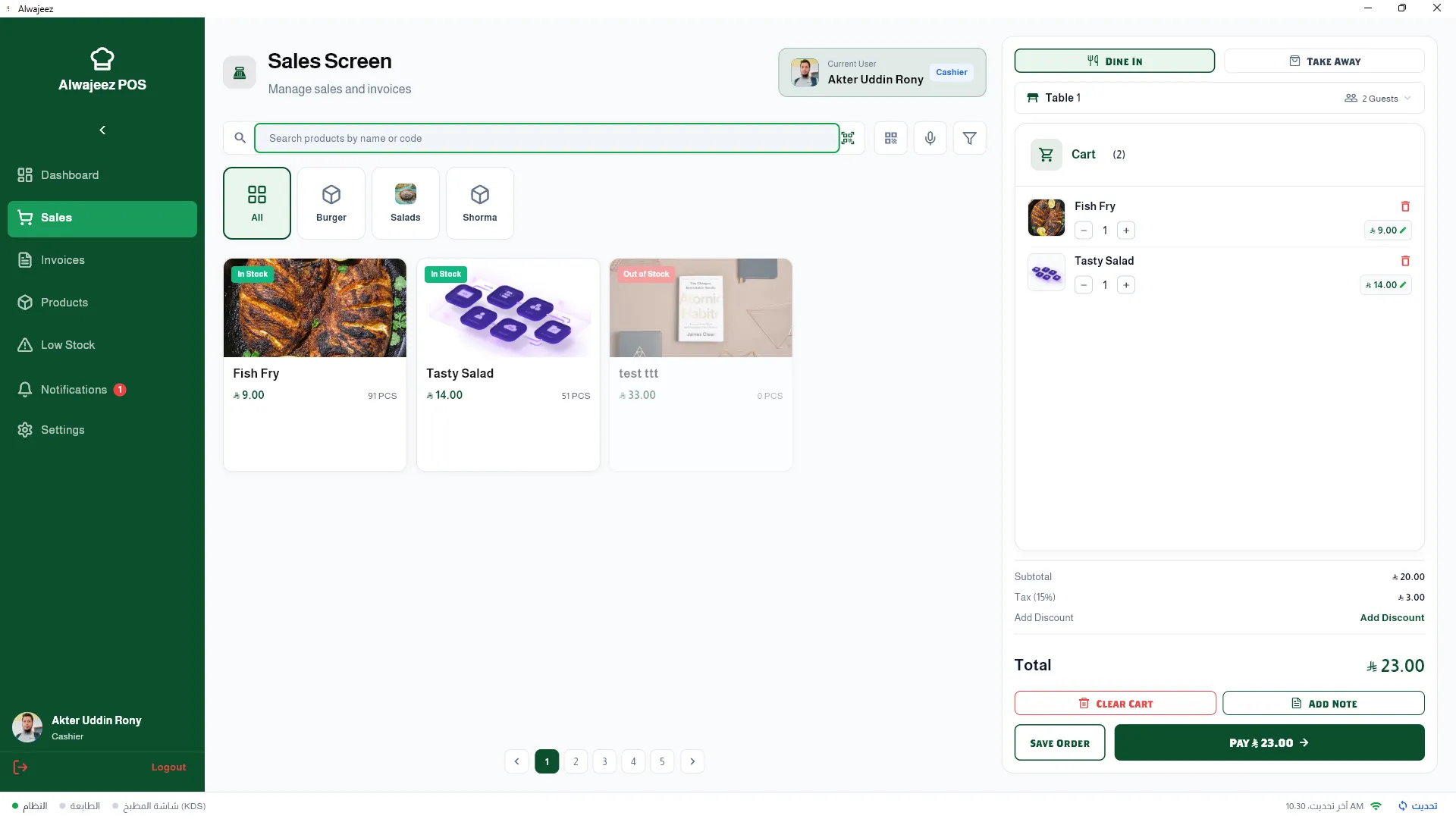
Figure 5: Tax-inclusive pricing ensures accurate VAT calculation on every sale
📄 Download Sample Documents (PDF)
Download sample ZATCA-compliant documents generated by ALZERP to verify compliance and print quality.
Frequently Asked Questions
What is a simplified tax invoice?
A simplified tax invoice is a document issued for business-to-consumer (B2C) transactions such as walk-in restaurant sales. It requires the seller's name, VAT number, timestamp, total with VAT, and a QR code, but does not require the buyer's name, address, or VAT number. This is the standard invoice type for 95% of restaurant transactions in Saudi Arabia.
What are ZATCA e-invoicing requirements?
ZATCA requires all VAT-registered businesses to generate electronic invoices using a compliant system. Each invoice must include the seller's name, VAT registration number, timestamp, line items, total amount including VAT, VAT amount, a sequential invoice number, and a TLV-encoded Base64 QR code. Handwritten and manually created invoices are no longer accepted.
How is the QR code generated on invoices?
The QR code is generated by encoding five data fields (seller name, VAT number, timestamp, invoice total, and VAT amount) into a TLV (Tag-Length-Value) byte array. This byte array is then converted to a Base64 string, which is rendered as a scannable QR code image on the invoice. ALZERP handles this process automatically for every transaction.
What are the fines for not having electronic invoices?
Fines for non-compliance start at 5,000 SAR for a first violation and can escalate up to 50,000 SAR for repeat offenses. Violations include not issuing electronic invoices, missing mandatory fields, missing or invalid QR codes, and using a non-compliant POS system. ZATCA inspectors conduct unannounced visits to verify compliance.
Can a POS generate ZATCA invoices offline?
Yes, ALZERP POS generates fully ZATCA-compliant invoices offline. Because ALZERP runs as a Windows desktop application with a local SQLite database, it does not require an internet connection to generate invoices, encode QR codes, or print receipts. This ensures uninterrupted compliance even during network outages, making it ideal for restaurants in areas with unreliable connectivity across Riyadh, Jeddah, and Dammam.
Ensure your restaurant is ZATCA-compliant — request a free ALZERP demo. With a one-time investment of just 1,500 SAR, ALZERP POS gives your restaurant lifetime ZATCA electronic invoicing compliance, automated QR code generation, and complete protection against fines of up to 50,000 SAR. Whether you operate a single outlet in Dammam or a growing chain across Riyadh and Jeddah, ALZERP scales with you — increasing your profits while keeping you fully compliant with Saudi Arabia's e-invoicing regulations.