
ERP AI Chatbot: What It Can and Cannot Do
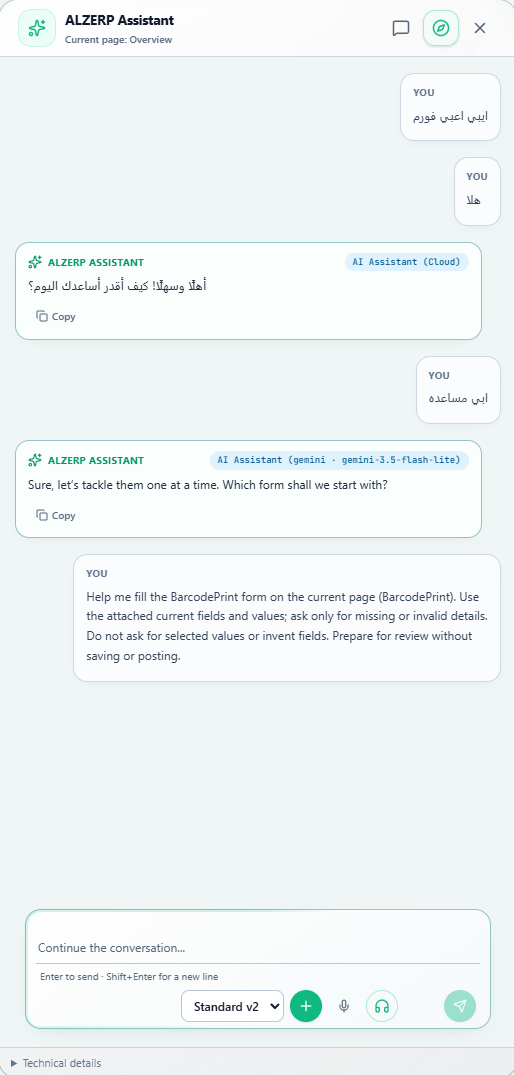
An ERP AI chatbot is a chat window inside your business software. You type or speak a request, and it opens a screen, reads a report, finds a record or prepares a document for you to check. This guide explains what a good assistant can do, what it should never do on its own, and how to test one before you buy. The examples come from the AI ERP assistant in Alwajeez ERP.
What is an ERP AI chatbot?
A normal chatbot answers general questions. An ERP AI chatbot is different because it sits inside your accounting, sales, purchasing and stock system. It works with your own company data, and it should follow the same rules as every other user of that system.
That last point is the most important one. A chatbot that can see more than the person asking is a risk. A good ERP assistant sees only what the signed-in user is allowed to see, in the company and branch that user works in.
What an ERP AI chatbot can do
These are the tasks an ERP assistant should be able to handle. Each one saves clicks for a busy owner, accountant or sales manager.
- Understand everyday language. You can ask in Arabic, English or a mix, in formal words or everyday dialect, and with half a sentence. When something is missing, such as a date range, it should ask a short follow-up instead of guessing.
- Read reports for you. Ask "how much did we sell since the start of the month?" and get a report card with the key figures, the period and a link to the full source report. Alwajeez ERP can read 47 reports this way.
- Find records and open screens. Ask for a customer, supplier, product or invoice, check stock availability, or say "open current stock" and land on the right screen, but only screens you may open.
- Prepare documents for review. Describe an invoice, customer or product, and the assistant fills the form for you. For sales and purchase invoices, customers and suppliers it shows a review card, and the record is saved only after you confirm.
- Sort files you upload. Drop a CSV, Excel file, PDF table or a photo of a table. The assistant maps the columns, checks duplicates and shows what will be added or skipped before you confirm.
- Explain and diagnose. Ask what a screen is for, why a document cannot be saved, or why you cannot open a page.
- Let you speak. Dictate a message, or use hands-free voice and listen to the answer.
- Review the week. Owners can read a short weekly business review, or receive it by email, with each point tied to a figure in the report.
What it should never do on its own
Good software keeps a person in charge. Whatever chatbot you choose, check that it follows these limits.
- It does not save, post, approve or pay by itself. Preparing is the assistant's job. Confirming is yours. In Alwajeez ERP a review card expires after 10 minutes and cannot be used twice, and voice alone cannot confirm a save.
- It does not file ZATCA returns on its own. Invoices saved from the assistant go through the same numbering, stock, VAT, ZATCA and posting rules as invoices created on the normal screens.
- It does not make up your numbers. Totals, balances, VAT and stock come from the ERP's own calculations. The assistant explains them and links to the source report.
- It does not see more than you can. Each tool checks your page and action permissions, your company and your branch before it runs.
Why the answer quality depends on the AI model
Behind every chatbot is a language model. Some models understand Arabic dialect and long requests very well. Smaller or free models make more mistakes. A fair vendor says this openly instead of promising perfect accuracy.
In Alwajeez ERP the company chooses. A branch admin can connect the company's own key from OpenAI, Anthropic Claude, Google AI Studio (Gemini), Groq, NVIDIA NIM, OpenRouter, DeepSeek or Mistral AI, or any compatible service, or use the built-in assistant. The key is tested, encrypted and limited to that company and branch.
8 questions to ask before you buy an ERP AI chatbot
- Does it work in Arabic, including everyday dialect, and in English?
- Does it follow each user's permissions, company and branch?
- Where do the numbers come from, the ERP or the AI's guess?
- Can I click from an answer to the source report?
- Does it ask me to confirm before anything is saved?
- Do saved documents follow the normal numbering, stock, VAT and accounting rules?
- Can I choose the AI model, or am I locked to one vendor?
- What exactly is sent to the AI model, and does it keep my voice or files?
Ask the vendor to show each answer live, in your own language, with your own kind of request.
How the assistant works in Alwajeez ERP
The assistant is a button on every page. It uses about 30 fixed, tested tools, such as open a page, read a report, search records and prepare a draft. It does not browse your database freely. Conversations are saved encrypted under your user, company and branch, so you can return to them on another device. Photo text recognition runs on ALZERP's own server, and the browser's speech service may process your voice, while ALZERP does not keep the audio.
Demand forecasting is available as a Beta for products with enough sales history. It is a preview that never creates orders or changes stock.
Frequently asked questions
Can an ERP AI chatbot replace my accountant?
No. It saves time on finding, reading and preparing, and your team keeps the decisions and approvals.
Is a chatbot safe for company data?
It depends on the design. Look for permission checks on every request, encrypted history, protected keys and a confirmation step before saving.
Can it answer in Arabic?
Yes. Alwajeez ERP understands Arabic, including everyday Gulf dialect, and English. Replies follow the language of your screen.
Can I try it before paying?
Yes. You can start a 15-day trial with no credit card and try the built-in assistant.
Ready to try an AI ERP you can talk to in Arabic? Start the 15-day trial, or book a demo on WhatsApp.